The figures
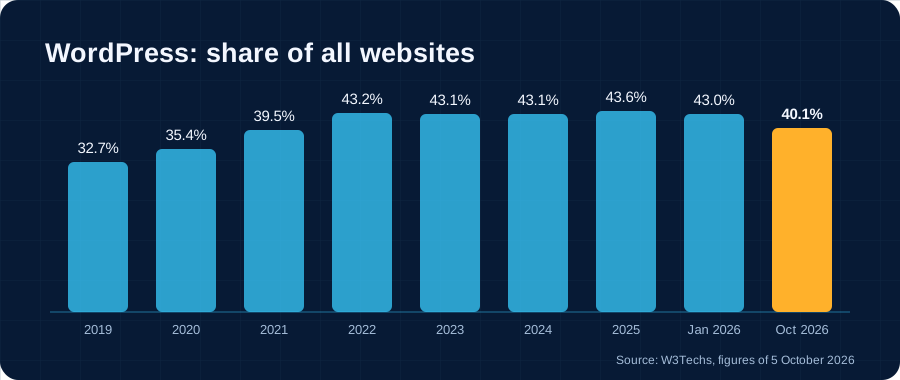
- Still number one. On 5 October 2026, WordPress runs 40.1% of all websites. The next ones are far behind: Shopify 5.4%, Wix 4.2%.
- But falling. Its share was 43.6% in early 2025 and 43.0% in January 2026. After years of growth and three flat years, this is the first real drop.
- Websites without a CMS are growing. They went from 28.6% to 31.5% between January and October 2026.
- The software keeps moving. WordPress 7.0 came out on 20 May 2026 (AI features, a modernised admin area), then version 7.1 on 19 August 2026 (settings per screen size, a new image editor, review notes).
A CMS is a content management system: it lets you edit a website without touching the code.
The weak spot: plugins
WordPress on its own does little. You add plugins: a form, a gallery, a newsletter, a shop. That is its strength, and also its weak spot.
- 11,334 security flaws were recorded in the WordPress ecosystem in 2025, 42% more than in 2024.
- 91% were in plugins. WordPress core had only 6, all minor.
- Nearly one flaw in two (46%) had no fix on the day it was made public.
Example: an association website with 20 plugins depends on 20 different publishers. If just one of them abandons its plugin, or is slow to fix it, the website is exposed. Such a website needs attention all year round.
Will WordPress be called into question?
It has already started, on three fronts.
- Governance. Since October 2024, the hosting company WP Engine and Automattic, the company of WordPress’s co-founder, have been in court. On 24 September 2026, the judge reinstated the antitrust claims. The trial is set for 19 October 2027. Until then, there is uncertainty about who steers the project.
- New competitors. Cloudflare presented EmDash on 1 April 2026 as a “successor” to WordPress. Each plugin runs in an isolated space, with explicit permissions. Version 1.0 came out in late September 2026.
- AI. It makes building a custom website or tool much faster than before. This is one possible explanation for the rise of websites without a CMS. WordPress is responding by building AI in as well.
Our reading: WordPress is not going away. It remains a good choice for a blog or a standard shop. But it is no longer the automatic choice: “what do we really need?” is once again the first question to ask.
Our back office, compared
For the associations, municipalities and businesses we work with, we develop our own back office (the admin area of the website). It contains the features you need, and nothing else.
| WordPress | Our back office | |
|---|---|---|
| Features | Thousands of plugins ready to install | The ones you need, developed for you |
| Updates | Core, theme and every plugin, all year round | A single codebase, which we maintain |
| Security | Depends on every plugin installed | No third-party plugins: fewer ways in |
| Screens | General-purpose, to be learned | In your own words: members, enrolments, newsletters |
| Online shop | Very complete with WooCommerce | Ticketing and simple payments |
| Providers | Very many, everywhere | Our team, who built your website |
| New needs | Often one more plugin | A development designed for how you work |
What WordPress does better: choice. For almost every common need, a plugin already exists, and you will easily find a provider to set it up.
What our back office does better: simplicity day to day. Volunteers and office staff find their own vocabulary, not that of a general-purpose tool. Enrolments, the member file, mail to members, cookie-free statistics and live video work together.
Example: for a music school, families enrol online, the committee follows the files and writes to parents, and teachers take attendance on a tablet. With WordPress, several plugins would have to be assembled and made to talk to each other. See our work.
Which one to choose?
- A blog, a standard brochure website, a shop: WordPress remains a good choice, with few plugins and regular maintenance.
- A website that does office work (memberships, enrolments, mail, documents): a custom back office is simpler to use and to maintain.
- Your WordPress website works well? Keep it. Sort through the plugins and check that updates are being done.
Not sure? Contact us: we look at your website and your needs, and tell you what suits you.
Sources: W3Techs, WordPress usage statistics · WordPress.org, release announcements · Patchstack, “State of WordPress Security in 2026” · webhosting.today, ruling of 24 September 2026 · InfoQ, EmDash · Accessed 5 October 2026.